
When you need to cut a flat sheet into a specific shape, you usually have two options: CNC routing or laser cutting. Both can follow a digital design to create precise profiles, but they remove material in very different ways. This difference affects the materials, geometries, and edge finishes each method can handle. This guide explains how each method works and how they differ.
What Is a CNC Router?
A CNC router is a computer-controlled cutting machine and one of the most common tools in CNC machining. It spins a cutting bit at high speed and moves it along X, Y, and Z axes. The machine holds the sheet flat with clamps or a vacuum table. The bit physically removes material and follows the toolpath from your CAD file, cutting profiles, pockets, slots, and engraved details. Most CNC routers use a spindle that runs between 10,000 and 24,000 RPM.

Materials CNC Routers Can Process
A CNC router cuts by removing chips with a spinning bit, so it works best on soft to medium-hard materials that react badly to heat.
- Wood: hardwood, softwood, plywood, MDF, and veneer panels.
- Plastics: acrylic, ABS, HDPE, nylon, PVC, polycarbonate, and POM.
- Soft metals: aluminum sheet and plate, brass, and copper in thinner gauges.
- Composites: G10, carbon fiber sheet, and aluminum composite panels.
- Foam and soft boards: EPS, PU foam, and machinable modeling board.
Benefits of CNC Router
Beyond its basic ability to cut programmed shapes, CNC routing offers practical advantages that make it suitable for a wider range of part requirements.
Thick Material Capability
A CNC router can cut wood and plastic boards that are several inches thick. The spindle can work through the material in successive passes, gradually reaching the required depth without relying on a single deep cut. This approach allows thick stock to be machined to the required profile and depth.
Complex 3D Features
The bit moves in Z as well as X and Y, so a CNC router can cut pockets, steps, chamfers, contours, and sculpted surfaces. Suppose you need a 10 mm acrylic panel with a 4 mm deep recess for a circuit board. The router can mill the recess and cut the outline in one setup. Parts with angled faces or features on several sides go a step further with multi-axis CNC machining without repeated repositioning.
No Heat Damage
CNC routing removes material mechanically rather than relying on heat to melt or vaporize it, so the cutting process produces little thermal effect on the workpiece. This helps preserve the original appearance of wood and plastic, reducing issues such as charred edges, discoloration, and heat-related warping.
Robust Construction
A CNC router uses a rigid machine frame to support the spindle and workpiece during cutting. This rigidity helps limit vibration and deflection, particularly when machining thicker or harder materials, allowing the tool to maintain a stable cutting path and produce consistent dimensions across repeated cuts.
Limitations of CNC Router
While CNC routing offers several practical benefits, CNC routing is not the right fit for every part or production requirement.
- Tool diameter limits: Fine details are limited by the diameter of the cutting bit. A 1 mm wide slot requires a sufficiently small tool, but smaller bits are more prone to breakage.
- High initial cost: Buying a CNC router, along with dust collection and software, can run into tens of thousands of dollars, which rarely pays off for a small number of parts.
- Slower on thin sheet: CNC routing uses a physical cutting tool, so repeated small features require additional tool movements. Thin sheets with detailed profiles may require more machining time.
- Regular maintenance: Dull bits leave fuzzy edges on wood and melted burrs on plastic, so bits, rails, and the spindle need routine care.
What Is Laser Cutting?
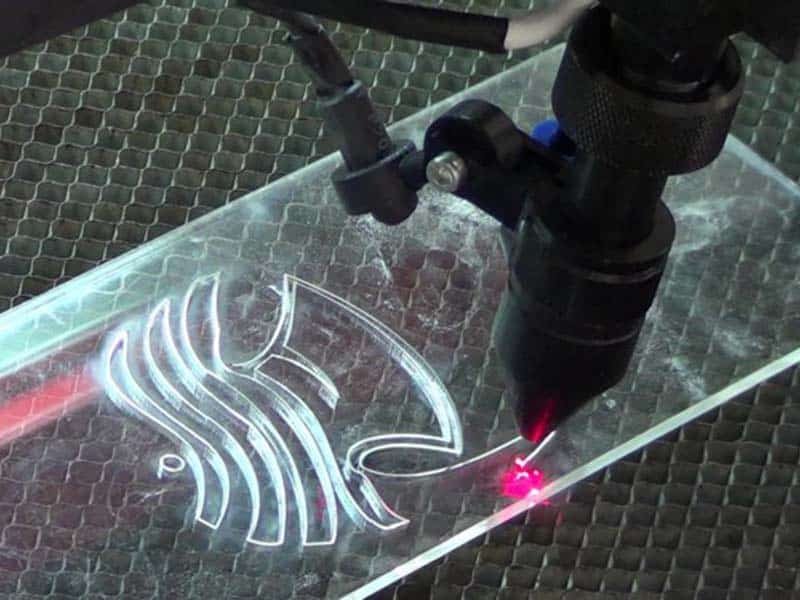
Laser cutting uses a focused beam of light to melt, burn, or vaporize material along a programmed path. As the laser moves, a stream of gas, such as air, oxygen, or nitrogen, helps blow the heated material away from the cut path and keeps the cut area clear. The laser beam works without physical contact with the sheet. The type of laser used depends largely on the material being processed.
Two laser types are commonly used. CO₂ lasers are suited to non-metals such as wood, acrylic, leather, and fabric, while fiber lasers are primarily used for metals such as steel, stainless steel, and aluminum.
Benefits of Laser Cutting
Laser cutting offers several advantages that can make it a practical choice for specific part requirements and production needs.
High Precision
Laser cutting can achieve tight tolerances on sheet, with tolerances around ±0.05 mm possible depending on the material, thickness, and machine. This makes it suitable for parts that require consistent dimensions across repeated cuts.
Very Fine Details
The focused laser beam creates a narrow cutting path, so only a small area of the material is affected during cutting. This allows laser cutting to produce small holes, narrow slots, and detailed profiles that may be difficult to machine with a larger cutting tool.
Minimal Mechanical Deformation
Because the laser does not exert cutting force against the sheet, thin or delicate parts can be processed with less risk of mechanical deformation. This also reduces the need for heavy workholding during cutting.
No Cutting Tool Wear
Laser cutting does not rely on a physical cutting edge, so there is no bit to sharpen or replace as material is removed. This helps maintain consistent cutting performance without the tool wear associated with mechanical cutting.
Limitations of Laser Cutting
Laser cutting works in two dimensions only, and heat brings side effects. These limitations are important to consider when choosing the process for a part.
- Thickness limits: As material gets thicker, the laser edge tapers and burns, and cut quality drops.
- Heat-affected zone: Heat can darken wood edges, harden metal edges, and warp thin plastic.
- Material restrictions: PVC, some coated materials, and reflective metals with the wrong laser type can cause damage or unsafe fumes.
- Cut-through only: A laser cannot mill a pocket to a set depth or carve a 3D surface. It can only engrave a shallow mark, but nothing more.
Design Guide for CNC Router and Laser Cut Parts
The cutting bit and the laser beam remove material in different ways, so each process sets its own limits on corners, small features, and spacing.
For a CNC Router
Inside corners always take the radius of the cutting bit, so the drawing should allow for the cutting bit radius wherever a sharp corner is not essential, so that the corresponding auxiliary steps can be planned from the outset.
Slots, grooves, and small features need to stay wide enough for the cutting bit to pass through, because the bit diameter sets the minimum feature size. For pockets, the width also needs to provide enough room for the bit to reach the required depth without excessive load, so wider and shallower pockets generally cut cleaner and hold size better.
For a Laser Cutter
Small holes and narrow features should stay in proportion to the sheet thickness, since the beam cuts thicker material less cleanly at fine scale. Features also need enough spacing from each other and from the sheet edge. Tight clusters concentrate heat, and a thin sheet is the most likely to warp when that happens.
Fine details may leave slight heat marks along the cut edge, so pay attention to those areas where appearance is important. If the part will be welded, painted, or coated, specify any required edge preparation or finishing so the cut edge can be processed accordingly.
Conclusion
CNC routers and laser cutters have different strengths and limitations, so the right choice depends on the part requirements. They can also complement each other when a project involves different cutting or machining needs.
For parts that require other CNC machining processes, Erye provides CNC machining for metals and plastics, with milling, turning, and multi-axis capabilities. Send us your drawing, and we can suggest a practical machining route.